Global checkout in 10 minutes? It's easier than you think
Published on September 29, 2025
Last week I spent three hours debugging why our Stripe webhook signatures weren't validating in staging. It turned out to be a classic: a miniscule difference in how the JSON body was being stringified between my local environment and the Vercel Edge runtime. This is my life now. It's a recurring nightmare of subtle cryptographic and environment-specific bugs that has absolutely nothing to do with building features people actually pay for.
So when I head of Dodo Payments, I was skeptical. Another payments SDK, I groaned. But I had a project to integrate, so I blocked off my afternoon.
I finished it before my second coffee.
The whole thing boils down to a pattern that feels less like a traditional payment integration and more like implementing "Sign in with Google." And that's the point. It's basically OAuth for money.
The Dance: How it Works
If you've done any social auth, you already know this pattern:
1. Your Server -> Dodo: Your server calls its own endpoint to say, "Hey, I need a checkout link for this product."
2. Dodo -> User: Dodo gives you back a secure, one-time URL. You redirect the user to it.
3. User -> Dodo: The user fills out their payment info on a page hosted by Dodo. Your app never sees a credit card number, so PCI compliance is not your problem.
4. Dodo -> Your Webhook: Dodo pings your server to say, "Hey, that user paid. Or they didn't. Here's the result."
This model keeps the sensitive stuff off your servers and makes the integration shockingly simple.
1: Configure in the Dashboard
First, get your API keys from the Dodo dashboard. While you're there, create a "Product" and set your webhook URL (e.g., https://yourapp.com/api/webhooks). This is the "few clicks" part no code required.
2: Create a Checkout Endpoint
Add a single API route to your server. The Dodo adapter exposes a Checkout function that you initialize with your API key. This five-line file becomes a complete, secure endpoint that securely communicates with Dodo's API to generate a one-time checkout URL.
import { Checkout } from "@dodopayments/nextjs";
import { appConfig } from "#/lib/config";

export const POST = Checkout({
  bearerToken: appConfig.dodo.apiKey,
  returnUrl: appConfig.dodo.returnUrl,
  environment: appConfig.dodo.environment,
  type: "session",
});
3: Trigger the Flow
From your frontend, make a request to that endpoint. You can pass custom metadata like your internal orderId or userId. This is the key to connecting the payment back to your application's state. The adapter handles the redirect automatically.
Here’s the code:
export async function createCheckoutAction(formData: FormData) {
  const productId = formData.get("productId") as string;
  const orderId = `order_${crypto.randomUUID()}`;

  await db.createOrder({ id: orderId, status: 'pending' });

  const response = await fetch(`${process.env.APP_BASE_URL}/api/dodo/checkout`, {
    method: "POST",
    headers: { "Content-Type": "application/json" },
    body: JSON.stringify({
      product_cart: [{ product_id: process.env.DODO_PRODUCT_ID, quantity: 1 }],
      metadata: {
        internalOrderId: orderId,
        internalProductId: productId,
      },
    }),
  });

  const { checkout_url } = await response.json();
  return { checkout_url };
}
The crucial part is the metadata. I create my own order record in my database before sending the user to Dodo, and I pass my internal orderId along. When Dodo calls my webhook later, it will include this metadata, so I know exactly which order to update.
4: Handle the Webhook
This is where I usually lose my mind. Verifying cryptographic signatures, checking timestamps to prevent replay attacks... it’s a minefield.
I instinctively started writing a function to parse the webhook-signature header, hash the body with my secret key, and do a timing-safe comparison. I spent 20 minutes on it before realizing the adapter does this for me. Again. Sometimes reading the docs first is actually a good idea.
The Dodo adapter does all that for you. You just provide your business logic:
import { Webhooks } from "@dodopayments/nextjs";
import { appConfig } from "#/lib/config";
import { db } from "#/lib/db";

export const POST = async (req) => {
  const handler = Webhooks({
    webhookKey: appConfig.dodo.webhookSecret,

    onPaymentSucceeded: async (payload) => {
      const internalOrderId = payload.data.metadata?.internalOrderId;
      if (internalOrderId) {
        await db.query(
          "UPDATE orders SET status = 'succeeded' WHERE id = $1",
          [internalOrderId]
        );
        console.log(`Order ${internalOrderId} marked as successful.`);
      }
    },

    onPaymentFailed: async (payload) => {
      // ... update DB to 'failed'
    },
  });

  return handler(req);
};
Here’s a simple sketch of that flow:
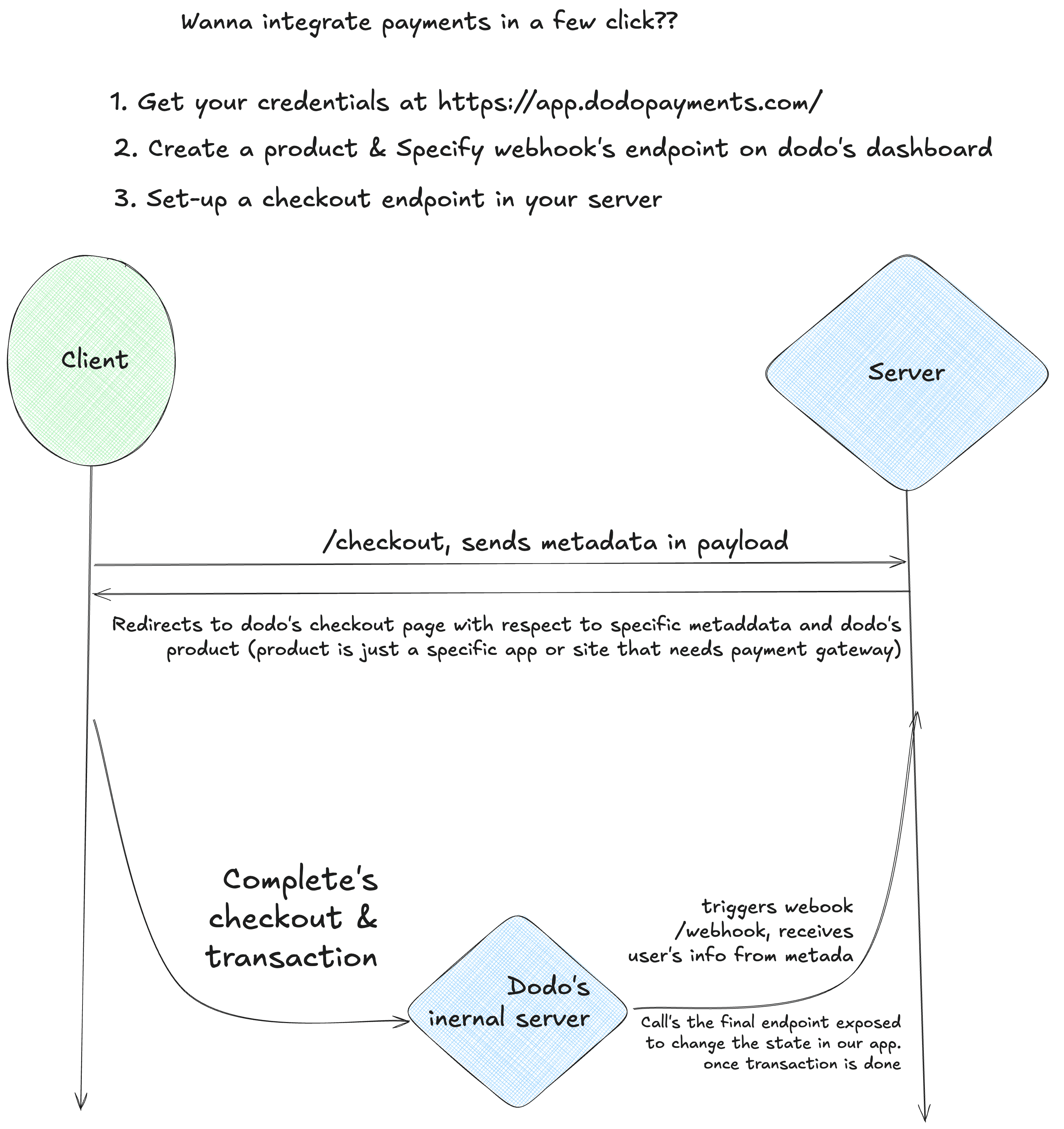
The model is dead simple: your app never touches card numbers. You redirect the user out, Dodo runs the payment, and they call your webhook with the result. If this smells familiar, it should—it’s basically OAuth but for money. Think of “Log in with Google”: you hit your own server, it redirects to Google, user does the auth, Google calls back your redirect URI, and you finish up. Same pattern here, just applied to payments.
The best part is you can get from zero to working checkout in minutes, not days. Which, if you’ve ever had to do payment integration the “traditional” way, feels like cheating.